Advertisement
Graphic Design Basics for Beginners
Graphic design is an essential skill in today’s digital world. From creating engaging social media content to designing professional logos and websites, strong graphic design skills help communicate ideas visually and capture attention. If you’re a beginner, learning the graphic design basics is the first step toward creating professional-quality designs.
In this guide, we’ll cover everything from design elements and principles to typography, color theory, tools, and practice tips. By the end, you’ll have a solid foundation to start your graphic design journey.
Advertisement

What is Graphic Design?
Graphic design is the art of combining text, visuals, and layout to communicate a message effectively. Designers use elements such as shapes, colors, lines, and images to convey information, evoke emotions, and create a brand identity.
Graphic design is everywhere:
- Logos and branding materials
- Website graphics and UI design
- Social media posts and ads
- Posters, flyers, and brochures
- Product packaging
Understanding the basics of graphic design allows beginners to create visually appealing content that resonates with audiences.
Why Learning Graphic Design Basics is Important
Learning the fundamentals helps you:
- Communicate ideas visually and clearly
- Build aesthetically pleasing designs
- Avoid common beginner mistakes
- Create professional-quality graphics
- Develop creativity and problem-solving skills
Even if you plan to use beginner-friendly tools like Canva or Figma, understanding design theory is crucial for producing high-quality results.
1. The Basic Elements of Graphic Design
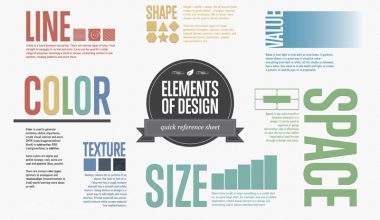
Every graphic design project is built on a few essential visual elements. These elements are the building blocks of every design.

Key Graphic Design Elements:
- Line – Defines shapes, divides sections, and guides the viewer’s eye.
- Shape – Can be geometric (squares, circles) or organic (natural forms). Shapes provide structure and form.
- Color – Evokes emotion, reinforces branding, and draws attention.
- Texture – Adds depth and tactile feel, even in digital design.
- Space (White Space) – Keeps designs clean, balanced, and readable.
- Typography – The style and arrangement of text is critical for communication.
Tip for Beginners: Practice combining these elements in small projects to see how they affect the overall design.
Learn more about 8 Essential Graphic Design Elements
2. Principles of Graphic Design
While elements are the building blocks, design principles are the rules that guide how elements work together.

Important Principles:
- Balance: Ensures elements are evenly distributed. Can be symmetrical or asymmetrical.
- Contrast: Differences in color, size, or font to make important elements stand out.
- Alignment: Keeps content organized and visually connected.
- Repetition: Using consistent colors, fonts, and styles for brand cohesion.
- Hierarchy: Guides viewers to the most important information first.
- Proximity: Groups related items together to improve readability.
Pro Tip: Beginners often make the mistake of cluttering designs. Using these principles ensures clean, professional results.
3. Typography Basics
Typography is a crucial part of graphic design. Good typography improves readability and creates a professional look.

Typography Tips for Beginners:
- Stick to 2–3 fonts per design
- Maintain proper line spacing and alignment
- Use font hierarchy (headings, subheadings, body text)
- Pair fonts wisely: serif with sans-serif for balance
Popular Fonts for Beginners:
- Sans-serif: Arial, Helvetica, Roboto
- Serif: Times New Roman, Georgia
- Display/Creative: Montserrat, Pacifico
Check our guide on Logo Design Inspiration to see how typography affects branding.
4. Understanding Color Theory
Color is more than decoration—it communicates emotion and brand identity.

Key Concepts in Color Theory:
- Primary Colors: Red, Blue, Yellow
- Secondary Colors: Green, Orange, Purple
- Complementary Colors: Opposite on the color wheel for contrast
- Analogous Colors: Next to each other on the wheel for harmony
Emotional Impact of Colors:
- Blue: Trust, professionalism
- Red: Energy, urgency
- Green: Growth, health
- Yellow: Creativity, optimism
5. Layout and Composition
Layout refers to how elements are arranged on a page or screen. Good layouts improve readability and engagement.

Tips for Beginners:
- Follow the rule of thirds for balance
- Use grids to maintain alignment
- Include plenty of white space
- Make the most important element the focal point
6. Best Graphic Design Tools for Beginners
You don’t need expensive software to start designing. Popular beginner-friendly tools include:
- Canva: Easy drag-and-drop editor, ideal for social media graphics
- Figma: Great for UI/UX design and prototyping
- Adobe Photoshop: Advanced photo editing
- Adobe Illustrator: Professional vector design
- Affinity Designer: Affordable alternative to Illustrator
Pro Tip: Start simple with Canva or Figma, then gradually explore professional software like Adobe Photoshop and Illustrator.
Download Free Mockups for practicing designs.
7. Practice Projects for Beginners

Hands-on practice is essential. Start with small, achievable projects:
- Social media post designs
- Logo concepts for fictitious brands
- Posters and flyers
- Website banners and headers
- Business cards
Consistent practice helps develop an eye for design and builds a portfolio for future opportunities.
8. Tips for Beginner Designers
- Keep it simple: Avoid cluttered designs
- Seek feedback: Share your work and learn from critiques
- Study other designers: Observe what works in professional designs
- Experiment: Try new styles, colors, and tools regularly
- Build a portfolio: Document your best work online
Frequently Asked Questions (FAQ)
1. What are the basics of graphic design?
The basics include design elements, principles, typography, color theory, layout, and visual hierarchy.
2. Can beginners learn graphic design easily?
Yes. With practice, tutorials, and beginner-friendly tools like Canva or Figma, anyone can learn graphic design.
3. Which software is best for beginners?
Start with Canva or Figma, and then progress to Photoshop, Illustrator, or Affinity Designer for more advanced work.
4. How long does it take to become a graphic designer?
With consistent practice, a beginner can learn the basics in a few months. Professional mastery takes 1–2 years.
5. Do I need to go to design school?
Not necessarily. Many designers are self-taught using online tutorials, courses, and practice projects.
Advertisement